How to fork from GitHub to Bitbucket as Private repository while developing
I’ll introduce how to fork a GitHub repository to a Bitbucket private repository for fork-like management while developing.

Background
I wanted to handle mastodon, which is published as a public repository on GitHub, as a Bitbucket private repository.
The reason is that Bitbucket allows private repositories for free.
While it would be easier to just fork directly on GitHub, I don’t use it because using private repositories on GitHub costs $7 per month.
This article is for developers like me who want to operate private repositories with free Bitbucket.
Steps to fork from GitHub to Bitbucket
I’ll explain step by step how to fork a GitHub repository to Bitbucket for development.
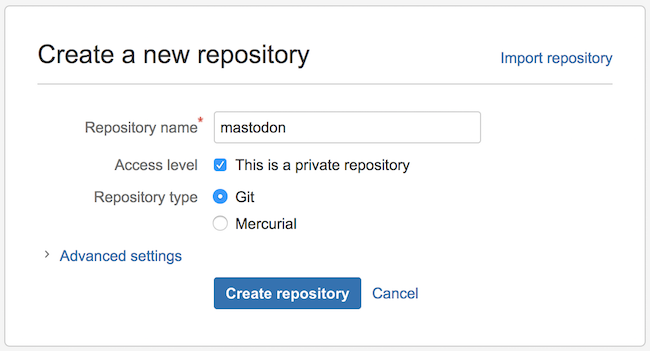
Create Private repository on Bitbucket
First, create a private repository on Bitbucket. I named the repository mastodon, same as the GitHub side.
Git clone repository from GitHub
Clone the GitHub repository to your local environment with git clone.
git clone git@github.com:tootsuite/mastodon.git mastodon
Git push to Bitbucket
Push the local environment repository to the private repository you created on Bitbucket to complete the fork-like flow.
cd mastodon
git push git@bitbucket.org:your_user/mastodon.git master
From now on, synchronize the repositories between GitHub and Bitbucket with git pull and git push git@bitbucket.org:your_user/mastodon.git master.
Add Bitbucket to remote repositories
Since doing git push git@bitbucket.org:your_user/mastodon.git master every time is tedious, let’s add Bitbucket to git’s remote repositories.
First, confirm that origin is only the original GitHub mastodon repository.
$ git remote -v
origin  git@github.com:tootsuite/mastodon.git (fetch)
origin  git@github.com:tootsuite/mastodon.git (push)
Add a new remote Git repository with git remote add [shortname] [url].
$ git remote add bitbucket git@bitbucket.org:your_user/mastodon.git
When you do git remote -v again, you can confirm that the remote repository has been added with the shortname bitbucket.
$ git remote -v
bitbucket  git@bitbucket.org:your_user/mastodon.git (fetch)
bitbucket  git@bitbucket.org:your_user/mastodon.git (push)
origin  git@github.com:tootsuite/mastodon.git (fetch)
origin  git@github.com:tootsuite/mastodon.git (push)
Summary
How was the setup procedure for fork-like operation of GitHub repositories to Bitbucket private repositories?
Currently, I’m developing by forking GitHub to Bitbucket, but aside from the initial setup, I don’t feel any particular hassle.
Please refer to this if you want to operate private repositories for free.
Reference Information
That’s all from the Gemba.